Monday, September 21, 2009

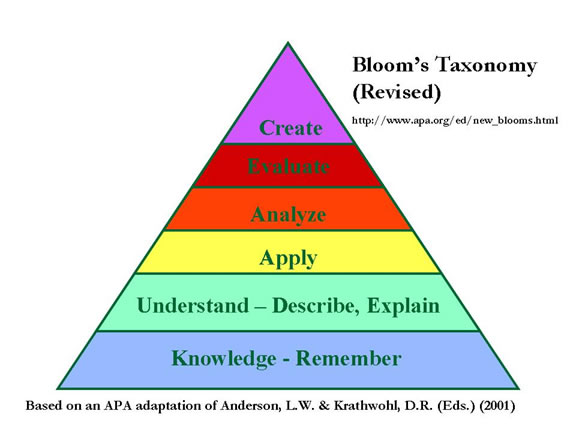
Quantifying Differentiated Instruction; Using Bloom's Taxonomy to Drive Learning


"Quantifying Differentiated Instruction; Using Bloom's Taxonomy to Drive Learning"
The Service Center @ Clearwater

Debbie Ives
dives@sckesc.org
13939 Diagonal Road
Clearwater, KS 67026
United States
Phone: (620) 584-3300 ext. 115
Fax: (620) 584-3307

Education: Superintendent, Principal, Teacher

Most teachers agree that differentiating instruction is a great idea and best for students, but how can teachers design lessons effectively and efficiently? Applying the principles of differentiated instruction can be a daunting task. By using the structure of Bloom's Taxonomy, teachers can quantify their lessons to provide for the needs of students as well as creating great, brain-stimulating, constructive lesson plans. Join Lori Jensen as she outlines the basic uses of Bloom's Taxonomy and provides easy-to-use ideas for structuring lessons in a differentiated instruction format. Participants will receive tools for next-day use that apply to any age and subject-matter and will have the time and instruction to develop a comprehensive plan for implementation. Instruction will be provided in lecture and discussion format.

3 hours

This program is by request and is available Monday- Friday 9:00-3:00 CST with a minimum of 2 weeks notice.

Cost per Site: $675.00

All dates are tentative until Purchase Order is received.
Please send a Purchase Order to:
South Central Kansas Education Service Center
Attn: Debbie Ives
P.O. Box 160
Clearwater, KS. 67026
Email: dives@sckesc.org
Fax: 620.584.3307

"Designing for Success: A Focus for Special Education" Overview


"Designing for Success: A Focus for Special Education" Overview
The Service Center @ Clearwater

Debbie Ives
dives@sckesc.org
13939 Diagonal Road
Clearwater, KS 67026
United States
Phone: (620) 584-3300 ext. 115
Fax: (620) 584-3307

Education: Superintendent, Professional Development Director, Administrator
Designing for Success: A Focus for Special Education This workshop, presented through lecture and discussion, is targeted for teachers who work with students with disabilities. The content focuses primarily on designing a standards-based curriculum for a special education program that will meet the No Child Left Behind focus of state assessments. Several forms will be shared for districts to consider using when planning for assessments, processing data form assessments and adapting state standards to individual students' needs and IEPs.
75 minutes
This program is by request and is available Monday-Friday 8:00-3:00 CST with a minimum of 2 weeks notice.
Cost per Site: $280.00
Premium Service provides additional benefits. Learn more!
Receiving Site is responsible for own line charge

Two upcoming professional development opportunities from Amon Carter Museum


Two upcoming professional development opportunities from Amon Carter Museum
Virtual Museum
Tuesday, Sept. 29th
4:00 - 6:00 PM CST
Cost ONLY $10.00 per teacher
Have you always wanted to integrate museum online resources into your curriculum, but didn’t know where to start? From teaching guides to book marking sites and from blogs to podcasts, this interactive broadcast will provide tips for both experts and novices on how to make the most of museums’ online offerings. This workshop connects to all levels of language arts, social studies, technology, and visual art. Participants will receive two hours of continuing professional development credit.

________________________________________
History of Photography
Tuesday, Oct. 20th
4:00 - 6:00 PM CST
Cost ONLY $10.00 per teacher
Learn about key American photographers and photographic processes and styles, as well as how photography from 1839 to the present day relates to American history. Connect photography’s history to all levels of language arts, science, social studies, and visual art.

Lori Hamm
lhamm@esc11.net
Connect2Texas is a service offered by
Education Service Center Region XI
and the
Region Eleven Telecommunications Network (RETN)
3001 North Freeway
Fort Worth, TX 76106
(817) 740-3625

Tuesday, September 15, 2009

SMART Notebook Software: Collecting and Sharing Content


SMART Notebook Software: Collecting and Sharing Content
Request this Program Now
SOITA

Bob Stricker
bob@soita.org
150 East Sixth Street
Franklin, OH 45005
United States
Phone: (937) 746-6333 ext. 120
Fax: (937) 746-1029

Education: Professional Development Director, Technology Director, Teacher, Media Specialist/Librarian, Administrator

Use screen captures, images, and files from other applications to help create engaging lessons and activities. Share your content by exporting your Notebook file to HTML, PDF, PowerPoint, or a series of images (JPEG, GIF, etc.) in case the recipient doesn’t have the Notebook software. Join us as we learn about the following: Capture Tool, importing and exporting files, and Notebook Print Capture.
60 minutes
Program Date Program Time Network Time Registration Deadline
All times below are displayed in Eastern Daylight Time, as specified in your profile.
9/29/2009 1:30 PM - 2:30 PM 1:15 PM - 2:30 PM 09/24/2009
9/29/2009 3:30 PM - 4:30 PM 3:15 PM - 4:30 PM 09/24/2009
9/29/2009 5:00 PM - 6:00 PM 4:45 PM - 6:00 PM 09/24/2009

This is a special one-hour event and will only be offered on Tuesday, September 29, at 1:30, 3:30, and 5:00 EST. Each session will be an interactive, multipoint videoconference.
Cost per Site: $75.00
Cost per Site with Premium Service: $67.50 What's this?
Premium Service provides additional benefits. Learn more!
Receiving Site is responsible for own line charge

iTunes Tips & Tricks in your Classroom


iTunes Tips and Tricks in Your Classroom
Request this Program Now
SOITA

Bob Stricker
bob@soita.org
150 East Sixth Street
Franklin, OH 45005
United States
Phone: (937) 746-6333 ext. 120
Fax: (937) 746-1029

Education: Curriculum Director, Teacher, Media Specialist/Librarian, Administrator, Public Library: Library Staff

iTunes is Apple’s multimedia player software which includes a store where users can download music, videos, television shows and podcasts. iTunes software is free and compatible with both Windows and Mac computers. It is a great tool for organizing your digital classroom content and accessing new content. iTunes software basics will be discussed along with tips for changing user preferences. Learn why you need to start using iTunes in your classroom!
60 minutes
Program Date Program Time Network Time Registration Deadline
All times below are displayed in Eastern Daylight Time, as specified in your profile.
10/6/2009 1:30 PM - 2:30 PM 1:15 PM - 2:30 PM 10/01/2009
10/6/2009 3:30 PM - 4:30 PM 3:15 PM - 4:30 PM 10/01/2009
10/6/2009 5:00 PM - 6:00 PM 4:45 PM - 6:00 PM 10/01/2009

This program will only be offered on Tuesday, October 6. Each session is an hour. Start times are 1:30, 3:30, and 5:00 EST.
Cost per Site: $75.00
Cost per Site with Premium Service: $67.50 What's this?
Premium Service provides additional benefits. Learn more!
Receiving Site is responsible for own line charge

Web 2.0 Essentials for Education - Part Two


Program Flyer: Web 2.0 Essentials for Education - Part Two

Julene Reed

Julene Reed
jreed@sgis.org
1880 Wolf River Blvd.
Collierville, TN 38017
United States
Phone: (901) 457-2170
Fax: (901) 457-2125

Program Series
This is a two part series. You may request both parts or any one individual part.
Education: Superintendent, Curriculum Director, Professional Development Director, Technology Director, Gifted and Talented Coordinator, Principal, Teacher, Media Specialist/Librarian, Administrator, Public Library: Library Staff, Content Providers: Educator, Administrator

What is all the buzz about social bookmarking, tagging, wikis, social networking, and the many Web 2.0 technologies that are key components of students' daily vocabulary? Which technologies can support and enhance the curriculum and help develop 21st century skills? How can educators effectively use the "read/write web" to motivate students and connect them with other students around the world? In this session (part two of a series of two), we will explore the ways educators can use additional Web 2.0 technologies (i.e., Ning, VoiceThread and Google Earth) to engage students, the digital natives, in the learning process.
1 hr 15 min
This program is available by request ONLY
Cost per Site: $325.00
Cost per Site with Premium Service: $300.00 What's this?
Premium Service provides additional benefits. Learn more!
Receiving Site is responsible for own line charge
On-location fee available on request.
Videotaping is permitted with prior approval from content provider.

Monday, September 14, 2009

Web 2.0 Essentials for Education - Part One

What is all the buzz about social bookmarking, tagging, wikis, social networking, and the many Web 2.0 technologies that are key components of students' daily vocabulary? Which technologies can support and enhance the curriculum and help develop 21st century skills? How can educators effectively use the "read/write web" to motivate students and connect them with other students around the world? In this session (part one of a series of two), we will explore the ways educators are using three basic web 2.0 tools (blogs, wikis, and social bookmarking), to engage students, the digital natives, in the learning process.

Program Length 1 hr 15 min
By Request This program is available by request ONLY
Connection Type(s) Available and Program Fees Cost per Site: $325.00
Cost per Site with Premium Service: $300.00 What's this?

Premium Service provides additional benefits. Learn more!

Receiving Site is responsible for own line charge
Program Fee Notes On-location fee available on request.

Posted from the CILC updates at www.cilc.org